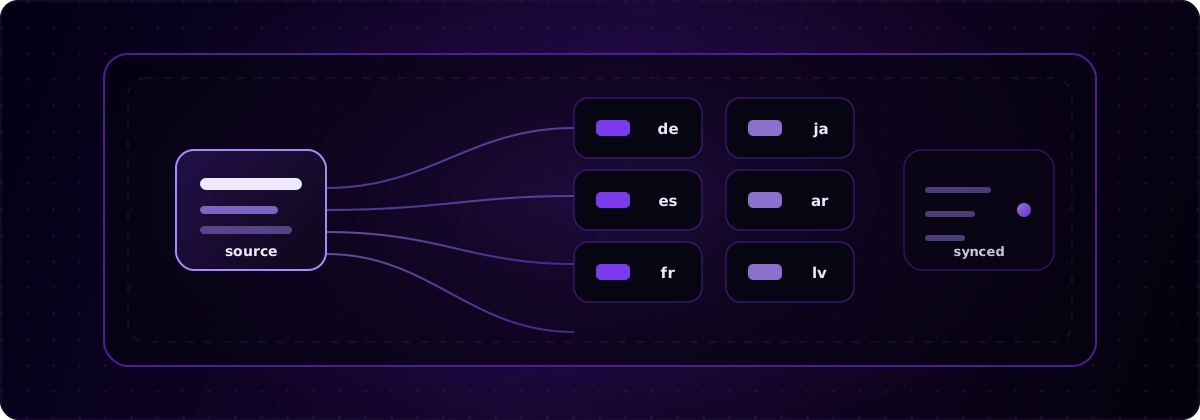
La localizzazione software è il processo con cui si adatta un prodotto software perché sembri nativo in una lingua, una regione e un mercato specifici, non semplicemente tradotto parola per parola. globalize.now è un’infrastruttura di localizzazione basata su IA che automatizza la parte ingegneristica più complessa del processo. Questa guida spiega cosa comprende la localizzazione, in cosa differisce dall’internazionalizzazione, perché fa crescere i ricavi e come farlo senza accumulare debito i18n in una codebase generata dall’IA.
Cosa significa localizzazione software?
Localizzare significa adattare il prodotto a un mercato target: lingua, formati e aspettative. La traduzione è solo il livello visibile.
Un’app localizzata correttamente traduce ogni stringa dell’interfaccia, ma formatta anche date, numeri e valute secondo le convenzioni del mercato, applica le regole di plurale corrette, supporta gli script da destra a sinistra quando serve e adatta tono, esempi e immagini, così nulla sembra estraneo. L’obiettivo è che chi usa il prodotto a Berlino, São Paulo o Riyad non si accorga mai che è stato creato altrove.
L’abbreviazione l10n che vedrai ovunque è un numeronimo: la parola localization inizia con la l, finisce con la n e ha 10 lettere in mezzo. La stessa abbreviazione dà i18n per internationalization.
In cosa differiscono localizzazione e internazionalizzazione?
L’internazionalizzazione è l’ingegneria che rende possibile la localizzazione; la localizzazione è il lavoro sui contenuti che viene dopo.
L’internazionalizzazione (i18n) è ciò che lo sviluppatore fa alla codebase: estrae le stringhe hardcoded nei file di traduzione, passa a Unicode, usa API di formattazione consapevoli della locale come Intl e struttura il layout perché gestisca l’espansione del testo e le lingue da destra a sinistra. La localizzazione (l10n) avviene per ogni mercato: si traducono le stringhe e si adattano i formati per tedesco, giapponese, arabo e così via.
L’ordine conta. Non puoi localizzare in modo pulito un’app mai internazionalizzata, perché le stringhe sono ancora incollate nei componenti e ogni lingua richiede un altro giro di chirurgia sul codice. Internazionalizza una volta, poi localizza ogni volta che serve. Se vuoi approfondire l’aspetto ingegneristico, la guida per sviluppatori di globalize.now spiega l’estrazione delle stringhe e la struttura dei file di traduzione.
Cosa comprende il processo di localizzazione?
Una localizzazione completa copre molto più della sostituzione delle parole inglesi con parole in un’altra lingua.
- Testo dell’interfaccia — ogni pulsante, etichetta, errore e stato vuoto, estratto dai file di traduzione invece di essere hardcoded.
- Numeri, date e valute — ogni mercato usa convenzioni diverse per separatore delle migliaia, decimali e simbolo della valuta, quindi lo stesso valore viene formattato diversamente in ogni locale.
- Plurali e grammatica — l’inglese ha due forme plurali; l’arabo ne ha sei. La concatenazione di stringhe hardcoded si rompe appena esci dall’inglese.
- Layout da destra a sinistra — arabo ed ebraico rispecchiano l’intera interfaccia, non solo il testo.
- Tono e immagini — registro, modi di dire, esempi e contenuti visivi che funzionano in modo diverso a seconda della cultura.
Se ne manca anche solo uno, il prodotto sembra tradotto da una macchina, erodendo la fiducia più rapidamente di quanto farebbe un lancio solo in inglese.
Perché la localizzazione software conta per la crescita?
La localizzazione è una leva per i ricavi, non un dettaglio estetico. La maggior parte dei potenziali utenti non acquista in una lingua che non legge.
Nel sondaggio di CSA Research su 8.709 consumatori in 29 Paesi, il 76% preferiva acquistare prodotti con informazioni nella propria lingua e il 40% dichiarava di non acquistare mai da siti in altre lingue. Il mercato lo conferma: nel 2024 il mercato della localizzazione software valeva circa 5,57 miliardi di USD e, secondo GMInsights, dovrebbe continuare a crescere a un CAGR a due cifre per il prossimo decennio. Ogni lingua che salti è una fetta di mercato accessibile che scegli di lasciare sul tavolo.
Per un indie hacker o un piccolo team, i numeri sono netti: lo sforzo per aggiungere tre o quattro lingue è ridotto rispetto alla quota di signup che un prodotto solo in inglese respinge senza dirlo. La guida di globalize.now per vibe coder spiega come stabilire quali lingue aggiungere per prime.
Dove si rompe la localizzazione nelle app generate dall’IA?
Gli strumenti di coding basati su IA rilasciano funzionalità rapidamente, ma quasi sempre inseriscono il testo dell’interfaccia direttamente nei componenti, rendendo dolorosa la localizzazione successiva.
Chiedi a Cursor, Claude Code, Lovable o Bolt di creare una schermata e ottieni un <button>Sign up</button> hardcoded, non una chiave di traduzione. Moltiplica il problema per un’intera app e ottieni debito i18n: centinaia di stringhe hardcoded, etichette duplicate e logica dei plurali rotta, sparse nella codebase. Quando finalmente decidi di aggiungere una seconda lingua, non stai localizzando. Stai prima reingegnerizzando l’app per renderla internazionalizzabile, una stringa alla volta.
È proprio questo il vuoto che globalize.now colma. Invece di cercare a mano ogni literal, l’estrazione avviene automaticamente e resta aggiornata mentre l’IA continua a generare nuove schermate.
Quali strumenti servono per localizzare un software?
La localizzazione è uno stack, non un singolo strumento, e ogni livello svolge un lavoro diverso.
- Librerie runtime i18n — i18next, next-intl, react-intl. Servono la traduzione corretta a runtime e gestiscono plurali e interpolazione.
- Infrastruttura di localizzazione — globalize.now. Estrae le stringhe hardcoded, genera chiavi di traduzione e file di traduzione e li mantiene sincronizzati a ogni push su Git. È il livello che manca alla maggior parte delle app create con l’IA.
- Sistemi di gestione delle traduzioni (opzionali) — Lokalise, Crowdin, Phrase. Gestiscono i workflow dei traduttori umani se lavori con traduttori professionisti.
- Motori di traduzione — DeepL, traduzione basata su GPT, lingo.dev. Producono il testo effettivamente tradotto.
globalize.now opera al livello dell’infrastruttura: non sostituisce il runtime i18n né un motore di traduzione. Genera e mantiene le chiavi e i file di traduzione da cui dipendono questi livelli, cioè la parte che altrimenti viene gestita a mano. Per un confronto tra vendor, consulta il confronto tra globalize.now, Lokalise e Crowdin.
Come si localizza un software senza accumulare debito i18n manuale?
Configura l’estrazione una volta e falla eseguire a ogni push, così la localizzazione non resta mai indietro rispetto al codice.
La versione manuale è un tapis roulant: esporti le stringhe, le invii, le reimporti, risolvi i conflitti e ripeti ogni volta che uno sviluppatore o uno strumento di IA aggiunge una schermata. globalize.now elimina questo giro. Scansiona la codebase, estrae le stringhe hardcoded nei file di traduzione, genera le chiavi di traduzione e sincronizza di nuovo tutto automaticamente a ogni push su Git, senza export manuali, code di revisione o differenze tra ciò che è stato rilasciato e ciò che è tradotto.
Per i team che sviluppano con strumenti di coding basati su IA, questa è la differenza tra una localizzazione configurata una volta e una localizzazione che diventa un lavoro permanente.
globalize.now gestisce il livello infrastrutturale di tutto questo. Configuralo una volta: estrarrà le stringhe e sincronizzerà i file di traduzione a ogni push su Git. Scopri come funziona su globalize.now.
globalize.now trasforma il testo hardcoded dell'app in file di localizzazione pronti e li mantiene aggiornati mentre rilasci.
Prova globalize.now gratis