
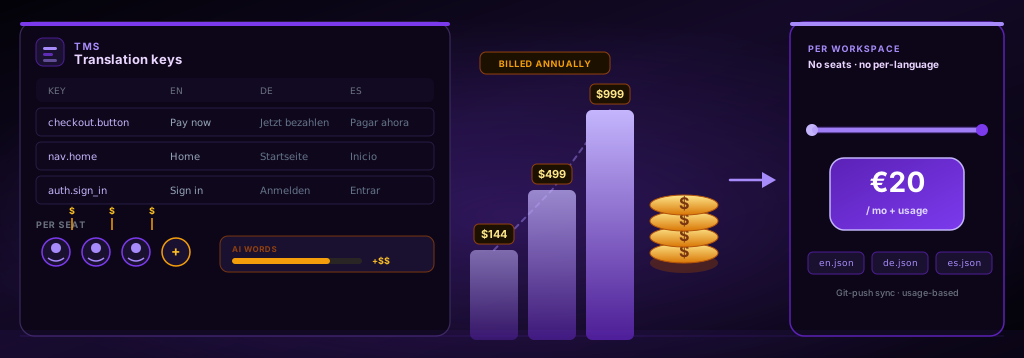
For a developer or small team, yes, Lokalise is expensive relative to what an AI-built app needs. Paid plans start at $144 a month (Explorer), jump to $375 a month (Growth), and reach $999 a month (Advanced), all priced per seat. globalize.now is AI-powered localization infrastructure built for the opposite cost shape: one €20-a-month workspace with no per-seat or per-language charges, and transparent token usage you can read in plain English.
What does Lokalise actually cost in 2026?
Lokalise has no permanently free plan — only a 14-day trial — then three published paid tiers and a custom Enterprise plan. Prices verified against lokalise.com/pricing on 14 August 2026.
- Free trial — 14 days, no credit card. When it ends you must pick a paid plan; there is no permanently free tier.
- Explorer — $144/mo.
- Growth — $375/mo.
- Advanced — $999/mo.
- Enterprise — custom pricing.
There is no cheap entry option. The moment the 14-day trial ends, the entry point is $144 a month. That is the number most "is Lokalise expensive" searches are really asking about, and it rarely appears on the first screen of the pricing page.
Why does Lokalise get more expensive as you grow?
Because the price is tied to two things you cannot freeze: seats and translated-word volume.
Lokalise is a per-seat product. Each paid tier includes a fixed number of "advanced" seats — roughly 5 on Explorer, 10 on Growth, 15 on Advanced — and additional seats cost extra beyond that. Add a second developer and a designer who edits copy, and you are paying for three seats whether or not they touch translations that month.
On top of seats, Lokalise meters Pro AI-translated words. Each tier ships a yearly allowance (around 50k words on Growth, 150k on Advanced), and going past it means buying top-ups. A team that ships frequently burns through that allowance faster than a team with a static catalog, so the same plan costs two teams very different amounts.
The result is a bill that moves with team size and release cadence rather than with the value you get. That is the structural reason a $144 plan quietly becomes a $400–600 line item.
Is the per-seat model the real problem?
The per-seat model is the real problem for the AI-coding audience specifically.
Tools like Cursor, Claude Code, and Lovable let one or two developers ship a full product. The localization work in that setup is mechanical: extract the hardcoded strings, generate keys, keep locale files in sync. None of it needs a translator workforce or a review queue. But per-seat TMS pricing assumes a localization team — translators, reviewers, project managers — and bills accordingly.
So a solo developer pays for a collaboration platform to do a job that is closer to a build step. The seats sit empty. The workflow features go unused. The bill still arrives. This is the mismatch the globalize.now developer overview is built around: the job is infrastructure, not coordination.
What is the cheapest localization tool for a small SaaS?
It depends on which model you are willing to accept, and "cheapest" splits into a few honest answers.
- Free / self-hosted: Tolgee and Weblate have free and self-hostable tiers if you are willing to run and maintain them.
- Low monthly: POEditor and Languine sit under $40 a month, and Crowdin's entry tier is around $59 a month.
- Per workspace, transparent usage: globalize.now is €20 a month per workspace, with no per-seat or per-language charges. Includes €20 of translation credit (about 200,000 words) a month; above that, token-based usage at the same per-character rate.
A note on the word "cheapest": some entry tiers from review-aggregator listicles undercut €20 on paper, but they meter seats, words, or both. The number on the pricing page is not the number on the invoice once you add a teammate or ship a busy month. For a developer, predictable pricing you can reason about matters more than the lowest advertised one.
How does per-workspace pricing without seats change the math?
Per-workspace pricing with no per-seat or per-language charges removes the two line items that make TMS bills hard to predict.
When the price does not depend on seats, adding a developer costs nothing extra on that axis. When languages are unlimited with no per-locale surcharge, expanding to Arabic or Hebrew does not trigger a new tier. Usage above the included characters is token-based at a published per-character rate, so you can read the bill in plain English instead of guessing from seat math and word caps. For an indie SaaS deciding whether localization is worth it at all, that transparency is often the deciding factor, not the entry price.
Here is the workflow difference in practice. With a per-seat TMS, you provision seats, connect a project, and manage exports. With globalize.now, you connect the repository once in the app and extraction and sync happen on every push. The same setup from a terminal:
npx skills add globalize-now/globalize-skills# a new key appears in your source on push
+ "checkout.button": "Pay now"
# locale files are generated and kept in sync automatically
+ es.json: "checkout.button": "Pagar ahora"
+ de.json: "checkout.button": "Jetzt bezahlen"No seat math. No per-language surcharges. No manual export step. The vibe-coders guide walks through the same setup for apps built with Lovable, Bolt, and Replit.
When is Lokalise still worth the cost?
Lokalise is worth it when you genuinely have a localization team.
If you employ translators and reviewers, run human QA workflows, manage glossaries and style guides across dozens of languages, and need audit logs and SSO for compliance, the per-seat model maps to real headcount and the price buys real coordination. That is the enterprise localization manager the tool is designed for.
If that does not describe you — if localization is one developer keeping locale files current — you are paying enterprise coordination prices for an infrastructure job. The honest comparison lives on the globalize.now vs Lokalise page.
globalize.now handles this. Connect your repository and the conversion runs once, in the app; the npx skills add globalize-now/globalize-skills skills cover what follows in your editor. See how it works at globalize.now.
globalize.now turns hardcoded app copy into translation-ready locale files and keeps them updated as you ship.
Try globalize.now free