
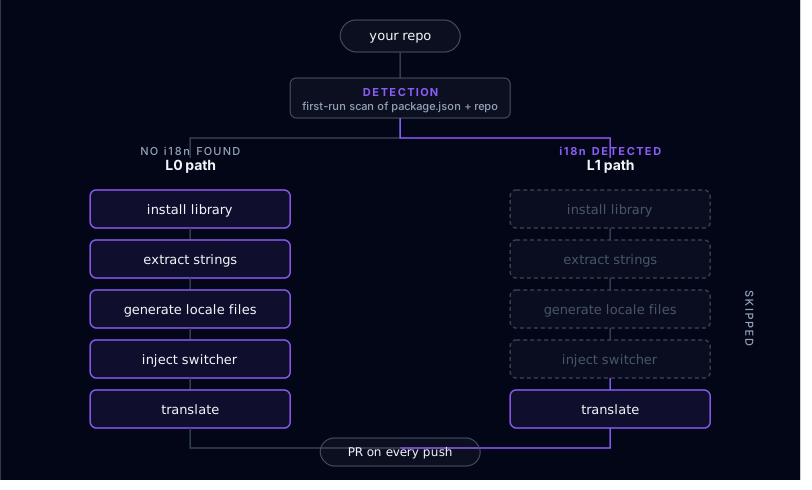
If your repo already has next-intl, react-i18next, i18next, or Lingui wired in — locale folders on disk, dependencies in package.json, middleware or config files — you don’t need another tool that pretends you’re starting from zero. globalize.now is AI-powered localization infrastructure. In L1 (already-internationalized) mode the product skips the destructive setup scaffold and stays in sync mode: read your source language, diff other locales on push, open pull requests with fills. This article is what that mode touches, what it refuses to touch, and what to do when detection gets it wrong.
Why does most i18n advice assume you are starting from zero?
Marketing copy for i18n tools still profiles the "greenfield" case: no library installed, no locale files, no extraction done. Most production codebases are not there.
In the last few weeks three unrelated first-touch sessions landed with the same shape: the team tried i18n once, got something half-working, and stopped — because ripping it out and redoing it felt worse than living with the mess.
If that is you, you are the reader this post is written for.
What does a half-internationalized codebase actually look like?
These patterns show up over and over (details anonymized):
- A Next.js + next-intl app where most components use
t()but older routes still ship hardcoded English because the first migration wave never finished. - A React + i18next project whose locale files exist but only contain English values — translating was always next quarter.
- A
messages/tree whereen.jsonis full andes.jsonis basically empty. - A language switcher wired into the layout that 404s sometimes because routing was only half-migrated.
None of these projects need globalize.now to start over. They need it to finish the job.
What signals does globalize.now scan for on first run?
Detection happens in two steps, not one.
First, point globalize.now at the repo. Connecting it in the app runs detection and the one-time conversion for you. If you would rather your agent do that pass locally, install the skills — this drops a few playbook files into .claude/skills/ and changes nothing else in your repo:
npx skills add globalize-now/globalize-skillsThen prompt your agent — Claude Code, Cursor, or Codex. The agent reads the installed skills and uses them to scan your repo:
Set up localization for my projectThat second step is where the detection actually runs. The agent looks for:
package.jsondependencies:next-intl,react-i18next,i18next,@lingui/core,@lingui/react,@lingui/macro, or anyi18next-*plugin.- Locale folders:
messages/at the repo root, alocales/folder, orsrc/i18n/with locale subfolders. - Existing locale files:
en.json,en.po,en.yml,en.yaml, or the default-locale file your library already expects. - Framework-specific config:
i18n.config.ts, next-intl middleware,lingui.config.js, or equivalents.
If at least two of those signals are present, the project is treated as L1 — already internationalized — and the setup flow branches instead of running the full greenfield scaffold. More detail lives in the Help Center article on existing i18n.
What does L1 mode refuse to change?
This is the part people care about. In L1 mode, globalize.now does not:
- Run the broad string-extraction pass that scans components for hardcoded literals.
- Generate new translation keys or reshuffle the key structure you already committed to.
- Scaffold locale files for languages you have not configured yet.
- Inject a language switcher. If you have one, it stays. If you do not, we do not add one.
- Rewrite routing, middleware, or framework config for you.
Your existing i18n setup stays yours. We do not refactor it in that mode.
What does L1 sync mode do after detection?
L1 is sync-first. After detection settles:
- We read your existing locale files to learn the current key shape and which language is the source of truth.
- You connect the GitHub repository through the globalize.now CLI or web app.
- On every push to your main branch, we diff the source-language file against the other locales. Missing translations are filled with AI output that respects the glossary and style guide you configure.
- A pull request lands with updated locale files. You review and merge. We never merge for you.
That is the loop. No translation dashboard to babysit. No manual exports. No file-format juggling.
Contrast that with the L0 walkthrough in How do I add i18n to a Cursor-built Next.js app in 15 minutes? — same product, different entry path.
What if only part of the UI uses translation calls?
That is the normal mid-migration shape: new screens use t(), legacy screens still leak literals. Outside sync mode, the skills pipeline treats already-keyed strings as locked: it focuses on literals that are not wired yet and preserves existing keys. Teams that ship weekly while halfway through that migration are the canonical "mixed L1" user in our logs.
For a full-agent conversion story on a gnarly tree, see What happens when an AI agent internationalizes a real monorepo?.
What should you do if the setup flow scaffolded everything anyway?
We’re tightening the detection logic so the wrong branch should not fire, but if npx skills add globalize-now/globalize-skills already produced a 100+ file diff that rewrites your locale folder, drops in a switcher you did not ask for, or reshapes routing — do not commit. Use the feedback widget (bottom-right) with your package.json dependency list and a quick note on how your locale folders are laid out; we can route the repo into L1 manually. A self-serve --existing-i18n CLI flag is shipping soon.
Recovery on your machine is git restore . plus git clean -fd if needed. Nothing was pushed; nothing production-facing broke; the agent only touched your local branch. The full write-up is in globalize_skills made too many changes — what happened?.
Why is "we tried i18n and stalled" the default story now?
This is not a slogan — it is a pattern. Three independent first-touch sessions in six weeks, three versions of "yeah, we attempted that; it is janky now." A Chrome extension with tens of thousands of users hit a Korean traffic spike and triggered a half-finished next-intl migration. A Lovable-built app broke its own build adding multilingual support and got reverted. A vibe-coded React + Vite repo wired i18next, filled roughly a third of the keys, and stopped.
The perfectly clean L0 codebase looking for a library absolutely exists, but it is not the bottleneck. The bottleneck is the codebase that already tried this once and now nobody wants to own the fallout.
L1 mode exists for that codebase.
How much does it cost?
€20 per month. One plan. Roughly 16,000 words (think ~80 typical app screens) included. €5 translation credit on signup. Whether you are L0 and greenfield or L1 dragging three years of locale debt, the price is the same — we meter throughput and automation, not how messy the first commit was.
Which posts and Help Center docs should I read next?
- L0 setup walkthrough for a Cursor Next.js app
- Monorepo case study — what an agent actually touched
- Why classic TMS tools struggle with modern Git-native stacks
- Help Center: I already have i18n — what does globalize.now do?
- Help Center: globalize_skills made too many changes
Ship the languages your traffic already expects — connect the repo at globalize.now, or read how the Git-push automation fits an existing team workflow.
globalize.now turns hardcoded app copy into translation-ready locale files and keeps them updated as you ship.
Try globalize.now free