
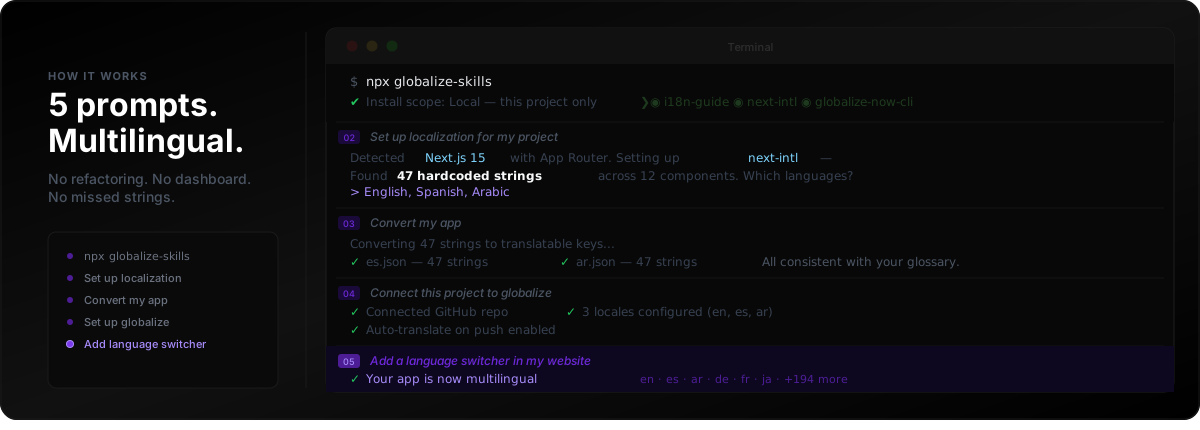
This article documents the five-prompt path from hardcoded English to multilingual Next.js or React apps using agent skills, Git-backed locale files, and automatic translation on every push. globalize.now is AI-powered localization infrastructure that keeps new UI strings synced without manual export loops or dashboard babysitting. Read the ROI case in Why You Should Globalize Your App, the stack map in Best Localization Tools for Vibe Coding in 2026, and the extraction deep dive in How to Localize an AI-Generated App. Vibe-coder-oriented copy also lives on the globalize.now page for vibe coders.
How does the five-step globalization pipeline work?
Where do you start?
Connect your repository at globalize.now. The first conversion runs once, in the app: it reads the repo, replaces the hardcoded strings with keys, and opens a pull request you review. Every push after that translates whatever is new.
If you would rather run that first pass from your editor, the same playbook installs into your agent — Cursor, Claude Code, Codex, whatever you work in:
$ npx skills add globalize-now/globalize-skillsThis installs i18n skills directly into your agent. It detects your stack and gives you a menu of what to load:
✔ Install scope: Local — this project only
? Which skills?
── Presets ──
❯◉ globalize-guide         — Detects stack, recommends i18n library
 ◉ lingui             — LinguiJS skills (setup, translate, code)
 ◉ css                — CSS i18n (logical properties, RTL)
 ◉ globalize-now-cli  — globalize CLI setup and usage
 ◉ next-intl          — next-intl for Next.js
Your agent now knows how to set up your project for translations. No manual config. No reading documentation.
How do you scaffold locales after installing skills?
Tell your agent:
Set up localization for my project
It scans your codebase, identifies your framework, recommends the right i18n library for your stack, and finds every hardcoded string across every component:
Agent: Detected Next.js 15 with App Router.
       I'll set up next-intl — best fit for your stack.

       Found 47 hardcoded strings across 12 components.
       Which languages do you need?

> English, Spanish, Arabic

Agent: Setting up 3 locales with RTL support for Arabic.
       Creating translation files...
This is the step that normally takes days. Your agent handles it in minutes: framework installed, locale structure created, RTL configured if needed.
How should you convert literals to translation keys?
Tell your agent:
Convert my app
It rewrites your components, replacing every hardcoded string with a translation key reference. Simultaneously it generates your locale files, populated and consistent with your glossary:
Agent: Converting 47 strings to translatable keys
       for Spanish and Arabic...

       ✓ es.json — 47 translatable strings
       ✓ ar.json — 47 translatable strings

       All entries consistent with your glossary.
Your codebase goes from hardcoded English to translation-ready architecture. The before and after:
// Before
<button>Submit order</button>

// After
<button>{t("checkout.submit_order")}</button>
How do you connect Git for automatic translation sync?
Tell your agent:
Connect this project to globalize
This connects your repository to globalize.now. From here, translations stay in sync automatically — no manual exports, no dashboard syncing, no missed strings when you ship new features:
Agent: Created project on globalize.

       ✓ Connected GitHub repo
       ✓ 3 locales configured (en, es, ar)
       ✓ Auto-translate on push enabled

       New strings translated automatically on push to main.
Every time you push code with new UI strings, globalize.now detects them, translates them, and PRs them back into your repo.
How do you expose locales with a language switcher?
Tell your agent:
Add a language switcher in my website
Your agent adds a locale switcher component to your UI, wired to your existing i18n setup. Users can now switch between languages.
That's the full pipeline. Five prompts. Your app is multilingual, your architecture is clean, and new strings stay in sync automatically as you ship.
What stacks does globalize.now support?
globalize.now works with Next.js, React, Vite, and React Router out of the box. It also integrates with GitHub, GitLab, Claude, Cursor, and Codex — developer teams with existing codebases and AI-built apps launching fast.
The globalize-guideskill automatically detects your stack and recommends the right library. You don't need to research which i18n framework to use — your agent handles that decision based on what's already in your project.
What does the pricing cover?
Everything is included at one tier: €20/month per workspace, with 100k characters of translated output included. CLI, API, GitHub sync, 50+ languages including RTL, and priority support.
globalize.now turns hardcoded app copy into translation-ready locale files and keeps them updated as you ship.
Try globalize.now free