
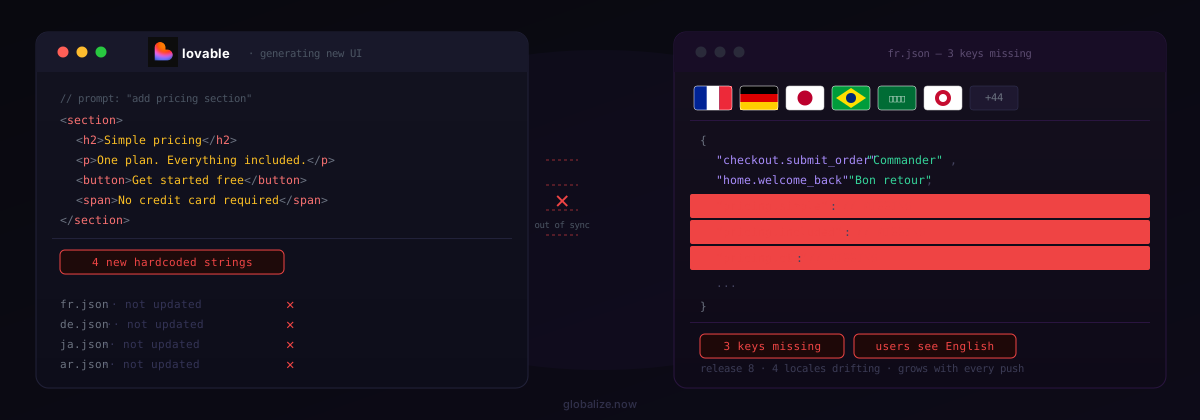
For a Lovable app, the real decision is runtime translation versus committed translation. Lovalingo and Weglot inject translations in the browser after the page loads. globalize.now generates locale files inside your repository and keeps them in sync on every push. globalize.now is AI-powered localization infrastructure: it extracts hardcoded strings from your AI-generated code, scaffolds the catalogs, and returns translated catalogs as a pull request, with no manual exports and no review queue. This guide compares the three on how they work, SEO, install path, and cost.
How do Lovalingo, Weglot, and globalize.now actually work?
They split into two camps: runtime widgets and committed catalogs.
Lovalingo is a React runtime library. You install @lovalingo/lovalingoand wrap your app in a provider; it detects content and translates it in the browser, generates locale URLs and hreflang, and drops in a language switcher. Weglot is a runtime layer too: a JavaScript snippet translates your existing site and serves languages over subdirectories or subdomains, with translation editing in Weglot's own interface. Both translate the rendered page rather than your source.
globalize.now sits one layer down, as localization infrastructure. The lovable-i18n skill installs Lingui, scaffolds a PO catalog per locale at src/locales/[locale]/messages.po, wraps strings in <Trans>macros, and adds a GitHub Action. After you connect the repository, every push diffs new strings and opens a pull request with updated catalogs. The translations live in your repo as real files, not in a vendor's runtime. If you are weighing the broader category, our vibe-coder localization guide walks through the same tradeoff.
What is the difference between runtime translation and committed catalogs?
Runtime translation happens in the browser; committed translation happens in your build.
A runtime widget ships your English app, then swaps text after the page renders. That is quick to add and needs no build changes, but the translated content is produced client-side at view time. A committed-catalog approach extracts your strings into locale files that are part of the codebase, so the translated text is compiled into the markup your app serves. You own those files, they live in version control, and they move with the repo if you switch tools.
This is also why translations on AI-built apps tend to drift. Every Lovable prompt can add new hardcoded strings, and a runtime overlay only catches what it sees at load. Wiring extraction into the push cycle keeps catalogs current instead. We covered this failure mode in why Lovable app translations break on every push.
How fast do translations go live?
Same-push minutes versus up to a day.
A runtime service has to process your site before it can serve other languages — Lovalingo's own app tells you to expect up to 24 hours for translations and pages to go live. With globalize.now, translation runs on the push itself: the moment you push new strings, it opens a pull request with updated catalogs, typically in minutes, so translated markup ships in the same cycle as the code that introduced it. For a Lovable app you iterate on daily, the difference is whether each change is translated by the time you merge, or a day behind.
Which approach is better for SEO on a Lovable app?
Committed catalogs index more reliably than runtime injection.
Search engines rank what is in the served HTML. When translations are injected client-side after paint, crawlers frequently see only the original English page, and per-locale indexing suffers. Weglot mitigates this by rendering languages on subdirectories or subdomains with generated hreflang, but its own guidance notes hreflang is produced with subdirectory or subdomain integration, not a JavaScript-only setup. Lovalingo generates hreflang and locale URLs as well, yet the translated text is still assembled at runtime.
With Lingui and committed PO catalogs plus locale routing, each language is a distinct, crawlable page whose translated markup is present before the browser runs any script. For a Lovable app that you want found in non-English search, that difference compounds over time. There is also no flash of untranslated text and no layout shift from late text replacement, which keeps Core Web Vitals clean.
How does each one install in a Lovable project?
Each has a different entry point: a provider, a snippet, or a skill.
Lovalingo is an npm install plus a provider wrapper around your app. Weglot is a script tag and an API key, configured in Weglot's interface. globalize.now installs inside the Lovable editor as a workspace skill:
# In Lovable: Skills → Add → Import from GitHub
https://github.com/globalize-now/lovable-i18n
Then you prompt Lovable directly:
Set up i18n for my project using the lovable-i18n skill.Lovable detects your stack (Vite SPA or TanStack Start), installs Lingui, scaffolds catalogs, wraps strings, and adds the GitHub Action. You connect the repository at globalize.now, pick target languages, and merge. Building the same repo in Cursor or Claude Code instead? Run npx skills add globalize-now/globalize-skills in the connected repo for the full bundle. The full walkthrough lives on the Lovable integration page.
What do Lovalingo, Weglot, and globalize.now cost?
The three use different meters: visitors, words, and characters.
Lovalingo offers a free tier up to 500 visitors, then moves to visitor-based pricing. Weglot starts free for 2,000 words and one language, then €15/month for 10,000 words and one language, and €29/month for 50,000 words and three languages; its word caps are fixed allotments rather than monthly-renewing pools. globalize.now is €20/month per workspace, including €20 of translation credit (about 200,000 words) per month, then token-based usage at the same per-character rate. There are no per-seat and no per-language charges, projects are unlimited, and signup includes €5 of credit with no card.
The practical read: a runtime free tier is the lowest-friction way to test a tiny site, while a character-metered workspace plan with no seat or language surcharges scales more predictably as an app adds languages and pages. Match the meter to how your app actually grows. For a deeper feature view across tools, see our comparisons.
Which should you choose for your Lovable app?
Choose by what you value: speed of overlay, or ownership and indexing.
Pick a runtime widget like Lovalingo or Weglot when you want to bolt languages onto a live site in an afternoon and you are not optimizing for non-English search. Pick globalize.now when you want translations that live in your repository, ship as indexable per-locale pages, and stay current automatically as you keep prompting Lovable. The first is a translation layer over the page; the second is localization infrastructure under the codebase. For an app you intend to grow into multiple markets, owning the catalogs and the SEO is usually the position you want to be in.
globalize.now handles Lovable i18n as committed catalogs. Add the lovable-i18n skill in your workspace, run npx skills add globalize-now/globalize-skills in the repo, or see how it works at globalize.now.
globalize.now turns hardcoded app copy into translation-ready locale files and keeps them updated as you ship.
Try globalize.now free